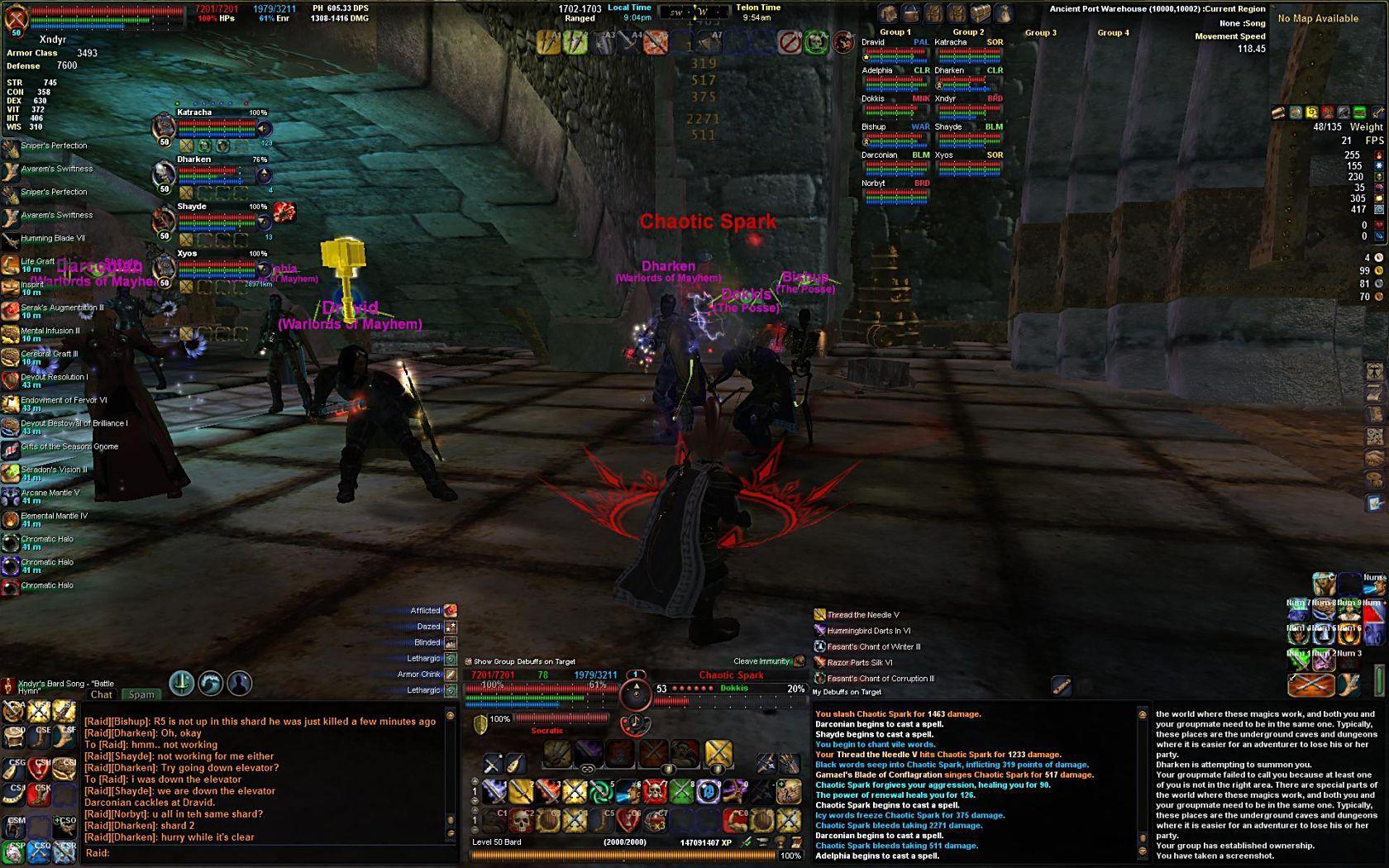
Primary Screenshot - myUI in action
|
| |
myUI Portal
This project has been a work-in-progress for nearly a year and a half, and even before that has evolved through a few other MMOs. Each game (EQ, EQ2 and now VG) has added something different that resulted in what you see now. I hope you enjoy it. Please use the links below (or to the right) to submit feedback or find information about myUI.
Bug Tracker:
CLICK HERE
Feature Request:
CLICK HERE
FAQ:
CLICK HERE
ChangeLog:
CLICK HERE
Update Notes v3.1 (26 mar 08):
this update will fixes a few problems introduced with the last GU4 update as well as adding features for today's patch.
New Features: - Added the new Riftway in Tanvu and updated the map files to include the new functionality
- New Scrollable Self Buffs window
- Adjusted the size of the icons so more will fit on the screen before needing to scroll through the list
- Moved the timer text to the left of the Icon (this keeps the height of each buff smaller so that they don't space too far apart)
- Buff window is resizable, from layout mode, so you can stretch the window taller to see more buffs, or narrower if you want to hide the text description
- When too many buffs are in the Buff window, you can now Mouseover inside the window and use your mousewheel to scroll the window up and down to see all buffs (very useful in raids
 ) )
Bug Fixes and Updates: - Removed the Fade effect from the hotkey banks (this wasn't a very popular feature--I didn't like it either, was just playing around to see what was possible).
- Added a new folder in the installation file that allows a player to pick the style of the UI HUD. The default HUD has many secondary windows linked to the offensive target. The readme.txt file has instructions on how to copy the new file if a player wants to move those windows independanty of each other (as well as instructions on how to pick and choose which windows are linked).
- Fixed the problem with many of the hotkey banks reseting their position to "snap" back inside the viewable window borders. They should stay where you put them now.
- Begun work on the color pack textures and reworking some of the basic XML to allow for support of the color packs again.
- This resulted in a smaller download file and smaller installation for now, but reverted back to using the default vgparts texture files (four of them) for now.
- Once the color pack textures are ready to go again, the new textures will reduce memory usage by probably 75%. They will be available as add-on optional downloads.
- Colors that will be available will be: Onyx, Amethyst, Ruby, Emerald, Silver, Gold and Platinum. (or if you prefer, black, purple, red, green, light grey, yellow and white hehe)
- And a few other misc bug fixes that I can't remember right now as I write this
 read the official myUI thread for things that I have probably fixed from feedback from users there read the official myUI thread for things that I have probably fixed from feedback from users there
Update Notes v3.0 (10 mar 08):
this update will bring myUI in to compatibility with Game Update #4, along with many other feature enhancements and updates.
New Features: - Added the Raid interface windows, And:
- skinned the Raid Group windows
- added functionality to move groupmembers around from the 4 group windows, instead of having to open the Social window
- Added the new Rift Windows that were added as part of GU4
- Updated the Quest Log window to
|