|
| Category: Complete SetsCoreUI3 1.6.53 |
| Interface Information |
|
| Name: |
CoreUI3 1.6.53  |
| Author: |
|
| Date: |
12-24-2008 04:34 PM |
| Size: |
9.96 MB |
| Version: |
1.6.53 |
| Rate Addon: |
|
CoreUI3 1.6.53
Fix index.xml file to point to correct name of Attachements/Enchantments file (Dev's dropped the ball on that one folks. Sorry)
CoreUI3 1.6.52
I suck and left out the User.ini in my haste to upload the version with the fixed graphics.
CoreUI3 1.6.51
Oops, I broke an image. Download this new one to fix it.
CoreUI3 1.6.5
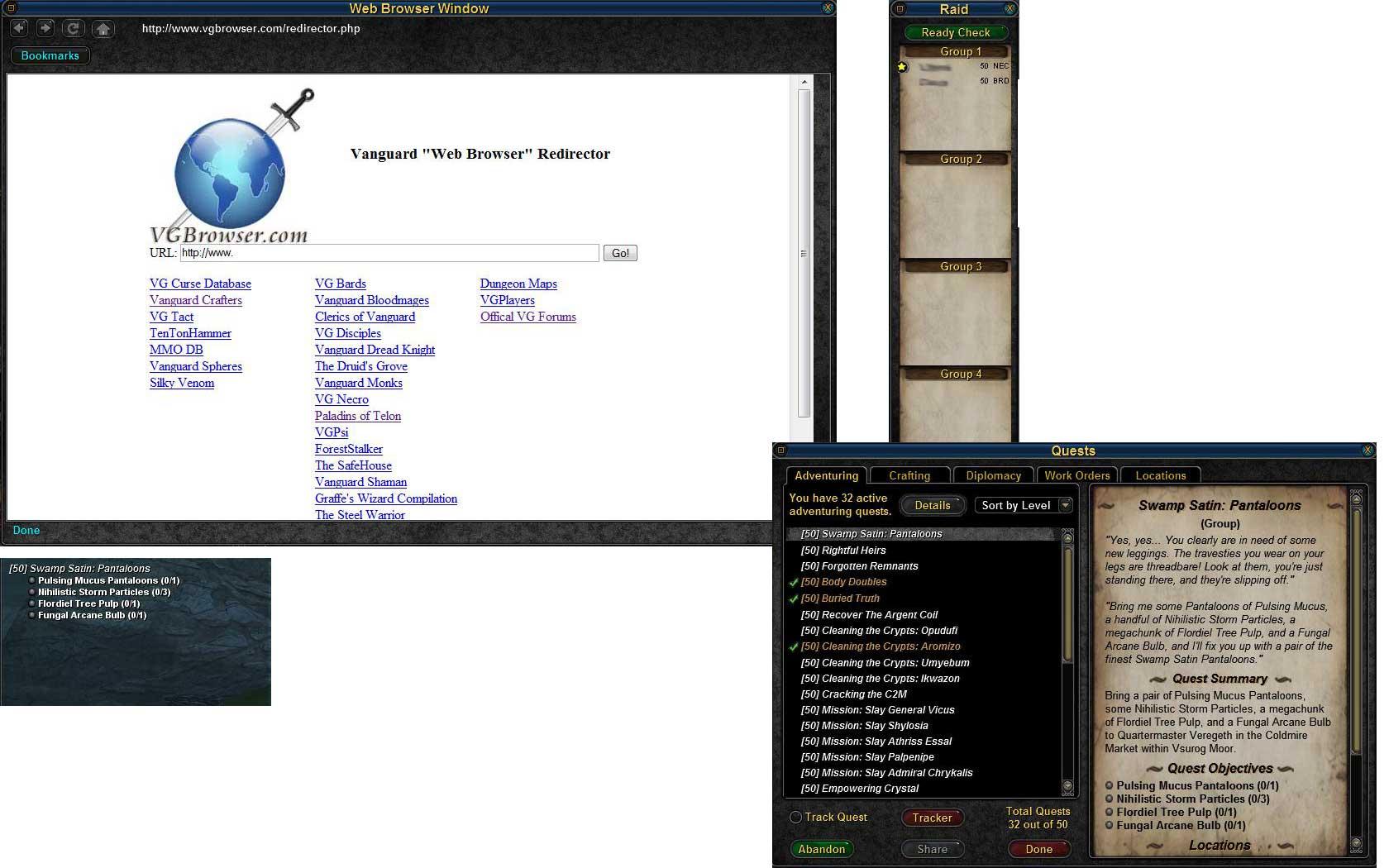
Fixed/Additions in this version: - Web Browser Window is now sizeable
- Numpad bar now has 4 banks. You will need to update your User.ini with the version in the bin folder in the zip file or add the needed bindings to scroll between them
- Updated UI to work with Fishing.
- Achievements tab in quest window has been tweeked to not have as ugly giant text.
- Added Tacklebox to mini secondary bag window
- Core Customizer 2.0.0.1
- New option in Core Customizer to use Maddycraft with the continental option
- Infomap updated to 1.12
CoreUI3 1.63
Updated MaddyCraft to newest version
CoreUI3 1.62
Fix for the people having an issue with Core Customizer 1.5.0.0
CoreUI3 1.61
Fixed/Additions in this version: - Xynder Scrollable buff list (now with smaller icons and time is displayed. Also the harmful/bard song list is a downward vertical list). You will need to reselect Xnydr's Scrollable Buff List in Core Customizer to use the new one.
- Market Search list is now Tab 1, Tab 2, Tab 3, Tab 4, Tab 5 instead of t1, t2, t3... The searches are all customizable in Core Customizer.
- Raid lockout timer fixed
CoreUI3 1.6
Fixed in this version: - Infomap 1.11
- Exchange Merchant Time remaining now shows correct time.
- Sailing Window reduced in size.
- Character window removed paper doll on left
- added toggle for defensive target in settings
- minor tweaks to some window's layout size (more coming in the future)
- MiniCards 1.0
- Xynder Scrollable buff list
CoreUI3 1.53
Fixed in this version: - Hotbar 2x4 sizable in Core Customizer
- Blockbar sizable in Core Customizer
- Added time remaining and relist options to market
- updated quest tracker with new option found in default
- made choose character list longer
- fixed bug in Mini Kinked where target HP bar wasn't displaying right
- added Aelwin's scrollable buff list as option in Core Customizer
- Core Customizer should always take focus now when you launch it
CoreUI3 1.52 (GU6)
Fixed in this version: - Fadebars are no longer single buttons
- Hidebars are no longer single buttons
- Made the change to the Pet window suggested by Skorpion68
- Finding the shell folder should be fixed
CoreUI3 1.51 (GU6)
Fixes: - Tower HUD fixed
- Kinked with Numbers fixed
- Mini Kinked HUD fixed
- Pet options fixed
- Mini Raid Window fades when not moused over
- Core Customizer now has an option to backup and restore your settings (so you don't have to redo all your options when new versions come out)
CoreUI3 1.5 (GU6)
Brand new offline options program. Run CoreCustomizer to customize CoreUI to your liking.
Changes: - GU6 Compatible
- New offline options editor called "Core Customizer" (created by Malacki)
- Option Horizontal Buff Bar
- Option for Classic Style Raid Window
- Option for Large or Mini Pet Windows
- Mini Kinked HUD
- Inclusion of Jackstraw HUD
- Inclusion of Maddy Craft
- Many more hotbars are resizable
- Infomap 1.9
- Browser Bookmarks are now customizable
- Browser has a "fix" button to use when the window doesn't display anything
- Browser defaults to a blank white page the first time you use it. This is in order to allow you to close and reopen the browser to the last page you were on.
CoreUI3 1.4 (GU5 Compatible)
Changes: - GU5 compatible
- minor tweaks to the quest log to reduce font size
- quest tracker is only sizable and movable in layout mode
- Web Browser and bookmarks of common sites
- raid group windows now appear when you join a raid automaticaly and can only be move in layout mode.
- removed raid group checkboxes
- Kinked HUD target's target is larger
- mini raid control panel
- smaller minion control window
If upgrading from a previous version of CoreUI3 please make sure to rerun the offline options file so that you can change the default settings back to how you want them.
Install notes are in the zip file.
|
| Archive List (Old Versions) |
File Name |
Version |
Size |
Author |
Date |
|
1.6.52 |
9.96 MB |
techywarrior |
12-17-2008 01:09 AM |
|
1.63 |
9.88 MB |
techywarrior |
11-01-2008 10:09 AM |
|
1.62 |
9.88 MB |
techywarrior |
10-29-2008 10:46 PM |
|
1.61 |
9.88 MB |
techywarrior |
10-29-2008 12:11 AM |
|
1.6 |
9.88 MB |
techywarrior |
10-27-2008 10:27 PM |
|
1.55 |
9.83 MB |
techywarrior |
10-23-2008 08:18 PM |
|
1.53 |
9.78 MB |
techywarrior |
09-15-2008 09:06 AM |
|
1.52 |
9.78 MB |
techywarrior |
09-11-2008 09:00 PM |
|
1.4a |
8.02 MB |
techywarrior |
06-06-2008 07:26 PM |
| File Statistics |
| User Rating: |
|
| Downloads: |
6636 |
| Views: |
18000 |
| Favorites: |
22 |
| Uploaded By: |
|
| Last Modified: |
N/A |
|
|  |
|
 |
|
12-28-2008, 01:47 AM
|
|
Junior Member
Forum posts: 1
File comments: 2
Uploads: 0
|
ToolTips
I just installed this. The ToolTips do not show up when loading the 1440 Resolution Preset.
Other than that I am greatfull for such a great UI. Have been using Drox, and hacking it to make it work up to this point but finally gave up.
THANKS!
|
|
|
12-15-2008, 07:22 PM
|
|
Junior Member
Forum posts: 0
File comments: 2
Uploads: 0
|
Removing Social and Diplo buttons
How do I remove the Social and Diplomacy Buttons?
|
|
|
11-06-2008, 04:01 AM
|
|
Junior Member
Forum posts: 0
File comments: 1
Uploads: 0
|
Serious issue - what do I do?
I have just downloaded and installed CoreUI3. I believe I followed your instructions to the letter. Yet upon running Vanguard, I have a serious issue with the mod. None of CoreUI's graphics or icons show. When I click the bag icons to open my inventory, nothing happens. When I try to open maps, nothing happens.
What info can I give you to help resolve this issue? I am reverting to default, but leaving CoreUI3 installed, in the hope that we can resolve this.
Hargir
|
|
|
10-28-2008, 11:07 AM
|
|
Member
Forum posts: 72
File comments: 11
Uploads: 1
|
You didn't look very hard on these forums
uiscale has never saved. It's an issue with the VGClient.... unless by chance you are talking about resizing the height and width of the window, and not the window contents itself. If you are talking about that, it was an issue that was fixed 2 or 3 patches ago.
|
|
|
10-27-2008, 05:35 PM
|
|
Junior Member
Forum posts: 0
File comments: 1
Uploads: 0
|
I have a question similar to cdeaths from below. I love the coreui so far, but I cannot get my hotbar sizes to save. Everytime I log in I have to reshrink them. I've tried the save option for the class in the ingame options menu, but it does not save my sizes. Am I missing something?
|
|
|
10-02-2008, 12:53 AM
|
|
Member
Forum posts: 72
File comments: 11
Uploads: 1
|
Re: VGClient.ini Change
make sure you have run the game at least once with the default UI since reinstall, then this will become available.
|
|
|
10-01-2008, 08:23 PM
|
|
Junior Member
Forum posts: 1
File comments: 1
Uploads: 0
|
VGClient.ini Change
I have been using Core for awhile now, with no problems at all. However, I had to do an uninstall/complete reinstall of the game (non-UI issue) and now I can't get the UI to work again.
The ReadMe says to open the VGClient.ini file in the Vanguard/Bin folder, locate the line showing the UI = default, and change default to CoreUI3.
This line doesn't show up in my VGClient.ini file. I have removed all Vanguard files, completely, and reinstalled. Which means I will have to set up my desktop again  but I can't figure out how to get the Core UI to work instead of the default.
What can I do??? I can't live with default. Can someone help?
Thanks in advance,
Sablerose
|
|
|
09-30-2008, 02:39 PM
|
|
Junior Member
Forum posts: 0
File comments: 1
Uploads: 0
|
A related problem I have had since GU6 is that the raid groups can no longer be toggled. I like to toggle off Group 4 because I don't need to see those health bars, but I see no way to do that now.
|
|
|
09-23-2008, 03:30 PM
|
|
Junior Member
Forum posts: 3
File comments: 1
Uploads: 0
|
RaidLockoutTimers
Since GU6, I have not been able to select lockouttimers to share with the raid. I am gussing it is a UI issue as other raid members can select the appropriate lockout to share. Anyone else using COREUI have this issue ?
|
|
|
09-22-2008, 02:04 AM
|
|
Junior Member
Forum posts: 2
File comments: 1
Uploads: 0
|
market remaining time
I am using CoreUI now for over a year, and I love it.  With gu6 the broker market mechanics changed, and techy adressed this with latest patch (9/15). But still, all I see at the market is the time "-1 day" (all my items, also all other items). A friend also using CoreUI and has the same problem. 
Any help will be appreciated.
|
|
|
09-22-2008, 01:52 AM
|
|
Junior Member
Forum posts: 11
File comments: 9
Uploads: 0
|
Resizing hobars 'permanently'?
I keep hitting "-" on a few of my hotbars each time I log in.
I see the external app has settings to set sizes/spacing.
If I understand correctly and this does what I want except permanently... what settings on size/spacing would I use to emulate the effect of clicking your predefined "-" size?
Awesome - thanks.
|
|
|
09-21-2008, 03:59 AM
|
|
Junior Member
Forum posts: 0
File comments: 2
Uploads: 0
|
Quote:
Nice work on keeping a great UI current. Two things I am having problems with though. I cant get the scrollable buff window to work properly. It resets to a small size every time I log out and I dont see a scrollbar on it. I used the offline options program to select it. The other thing I cant seem to get to work is I am trying to substitute the ManicUI raid window for yours because it has hotbar slots on it for the raid groups and I really really want them. Any ideas would be helpful. Thanks.
Update: I figured it out the raid window thing, but the buff window is still baffling me.
|
It's not a core made modification, it was incorperated from an independent developer. You'll have to contact the creator of that scrolling buff bar (it does scroll, use the mouse wheel) i've seen the same issue.
|
|
|
09-21-2008, 03:52 AM
|
|
Junior Member
Forum posts: 0
File comments: 2
Uploads: 0
|
Current Issues
Core is a great UI and I love the newest update, but I'm having some issues with it. The blockbar and chat windows do not save their settings when i camp to another character. They revert to being all misaligned and the blockbar reverts to full size (i shrink it in half because i don't need so many rows) but when I relog it just goes back to full size. The chat windows DO load properly IF i use the "load" button from the Load/Save tab. But, the blockbar does NOT do that. Anything I can check or maybe fix this myself? I know my way a little bit around the XML files if anyone has a fix for this.
Thanks.
|
|
|
09-20-2008, 04:16 PM
|
|
Junior Member
Forum posts: 0
File comments: 2
Uploads: 0
|
/toggle core buffs
I went into the core customizer and set the buffs both vert. and Hor., still nothing. I toggled on and off in the game settings, and again it would not show. The buffs toggle is toggleing my offensive targets buffs and not the core buffs window. My core bufffs window is gone and will not reappear.
|
|
|
09-20-2008, 11:18 AM
|
|
Member
Forum posts: 72
File comments: 11
Uploads: 1
|
As of GU6, /togglewindow /showwindow and /hidewindow no longer work, this means you have to use an in-game settings window to toggle the visibility of all windows or for coreUI, I believe you must use the offline settings application 
|
|
|
All times are GMT -5. The time now is 02:19 AM.
|
 |